What I Learned From Doing pSEO Full-Time for Years
One of the trends that became popular right before the AI wave, and still remains one of the top SEO topics in the AI era, is pSEO (programmatic SEO or SEO at scale).
The funny part is that only about a year ago I accidentally discovered that what I had been doing for the past few years actually had a name. Apparently it wasn’t just “SEO for a massive website,” it was an entire skill set. That surprised me, because in my mind I was simply doing SEO, just for a slightly oversized site with more than a million URLs.
However, I also saw that the same tactics could easily apply to smaller websites in order to save resources, have more impact and test tactics more efficiently.
So I’d love to share these tactics with you, so you can benefit from my experience whether you work on a large website or a small one.
So, what is Programmatic SEO?
pSEO is a strategy where you create or optimize a large number of web pages automatically instead of doing it page by page. It becomes a necessity, not a choice, when you work with large websites that have hundreds of thousands of URLs. Manually optimizing each one is simply impossible.
For marketplaces, these are the listing pages that group many different results together. Think “second hand laptops,” “apartments for rent in Spain,” or “SEO jobs in Barcelona.” These pages scale fast, so you need a sustainable way to optimize them.
It can also work for smaller websites when you need to create or optimize many similar pages that follow the same template but target different long-tail keywords.
For example, if a brand has stores in multiple locations and you want to target each one, you wouldn’t manually optimize every page with fully unique content. Instead, you’d create a reusable template and personalize it with variables for each location.
What can you optimize with pSEO?
pSEO can be used to create new pages or to optimize the ones you already have.
Creating new pages with pSEO
pSEO is a way to create dozens, hundreds, or even thousands of pages while keeping the effort low. Here are a few use cases:
Transactional pSEO Pages
pSEO can be used to create transactional pages for e-commerce or marketplace websites that display results based on specific criteria.
For example, imagine you have hundreds of dresses on the site and you want to target all the long-tail keywords. After doing some research, you notice that people mostly search for summer dresses by color and length.
Instead of creating each page manually, you define a simple rule:
Generate all possible combinations using the variables “color” and “length”:
[color] [length] dresses
Since all these parameters already exist in your product cards, you can instantly generate dozens of landing pages using this pattern. For example:
Yellow mini dresses
Yellow midi dresses
Yellow maxi dresses
Red mini dresses
Red midi dresses
…and so on.
All these pages follow the same template but display different products and personalized elements based on variables, such as:
Title: “Sustainable [color] [length] dresses | Brand”
Meta description: “Discover more than [number] sustainable [color] [length] dresses at a low price.”
H1: [color] [length] dresses
Short description: [number] of [color] [length] dresses found
Editorial text at the end of the page: “Everything you need to know about [color] [length] dresses … “
The main idea is to create patterns that make sense at scale, without having to review or build each page manually.
When implemented correctly, these pages update automatically as new products appear or old ones are removed.
Informational pSEO pages
Another pSEO use case is creating informational pages based on the data you already have. For example, if you work in the jobs sector and have salary data by region, you can automatically generate pages following a pattern like:
Average salary for [job] in [location]
For example:
- average salary for SEO professional in Barcelona
- average salary for SEO professional in Madrid
- average salary for SEO professional in London
- average salary for CRM specialist in Barcelona
…and so on
The logic is the same as with transactional pages. Think of something that would be relevant to many different groups of people, and then create a pattern that matches the demand.
Local pSEO Pages
Another use case is creating local pages. If your website has stores in 20 different cities but offers the same product line everywhere, it can make sense to create separate pages with store information to target for local searches.
The template stays the same, but the address, store images, and a short description can vary to provide useful details.
These pages can also include customer reviews and other personalized elements.
How to create a pSEO strategy for new pages
- Do market research, keyword research, and competitor analysis.
Look for repeating patterns in the data. Are there topics, attributes, or queries that show up again and again?
- Talk to the data, product, and sales teams.
Are there data points customers keep asking about? Is there a database that could provide real value to users?
- Think of a pattern you can test.
Define 10 to 100 pages (depending on your website size) that you can create at scale.
- Create SEO-friendly pages and link them internally.
Then monitor performance. Give them 4 to 6 weeks to see if they attract meaningful traffic and conversions.
- Evaluate the results.
If the experiment works, scale it up and launch more pages following the same pattern. If it doesn’t, review what went wrong and either iterate or roll back.
Optimizing existing pages with pSEO
If your website has more than a few dozen URLs, chances are you already have different page types that follow similar patterns (ecommerce pages, local pages, guides, and so on). In that case, you can optimize on-page elements at scale.
On-page Elements Optimization
It’s possible to optimize titles, descriptions, H1s, and other elements by applying the same pattern to all pages within the same section. The trick is to experiment with different patterns and apply changes to a group of similar pages at the same time.
Going back to our dress page example, let’s imagine that we launched our
[color] [length] dresses pages and they performed pretty well.
But then we realized we could highlight a competitive advantage: the fact that our clothes are made from sustainable materials.
In that case, we could optimize all H1s at scale by adding the necessary keyword:
[color] [length] dresses → Sustainable [color] [length] dresses
We don’t have to change every H1 separately, and instead, modify the pattern for this pagetype.
Run A/B Tests by Applying Changes to a Specific group of URLs at Scale
Another big advantage of pSEO is the ability to test on-page elements at scale.
Running a test on 50 pages gives you far more reliable results than testing on just 3 or 5.
You can use programmatic SEO to test link modules, breadcrumbs, schema, on-page elements, and much more.
Create Automated Editorial Content (With or Without AI)
Another pSEO use case is creating editorial content at scale, such as FAQ blocks, price overviews, or product data summaries.
You can do this using generative AI or by defining parameters that are inserted into the text based on the page where it appears.
Important Things to Keep in Mind
pSEO is not about fixing individual broken links or optimizing pages one by one. It’s about finding patterns and actions that can improve large groups of pages at once to achieve the biggest impact.
It’s about analyzing structure, architecture, and systematic issues instead of getting stuck on small fixes and isolated errors.
How to Leverage AI for pSEO
Agentic SEO offers an enormous opportunity to streamline workflows and scale SEO efforts.
Here are just a few examples of how LLMs can support a pSEO strategy:
- Create unique editorial content blocks at scale, such as summaries, short descriptions, and FAQs
- Integrate Ahrefs MCP with ChatGPT or Claude to perform keyword research, content gap analysis, and detect patterns that could be used for pSEO
- Perform benchmarking at scale to identify on-page elements competitors use and test them later
- Analyze SERPs (via API), and give search intent and featured snippets recommendations for specific pagetypes.
A Few Great Examples of pSEO Before We Finish
Perplexity Discover
Perplexity creates news pages at scale, improving their usability and making them more relevant for users.

https://www.perplexity.ai/discover/top/study-finds-early-universe-for-ikklm0rQT4uxUkmcmjfGoQ
Preply Listing pages
While I’m using Preply as an example, any marketplace websites follows the same strategy: creating lots of transactional listing pages at scale to bring better and faster user experience to potential clients.

https://preply.com/en/classes/english
Tripadvisor Local Pages
Tripadvisor is another great example of a website leveraging pSEO to create informational pages and guides at scale for different locationas.
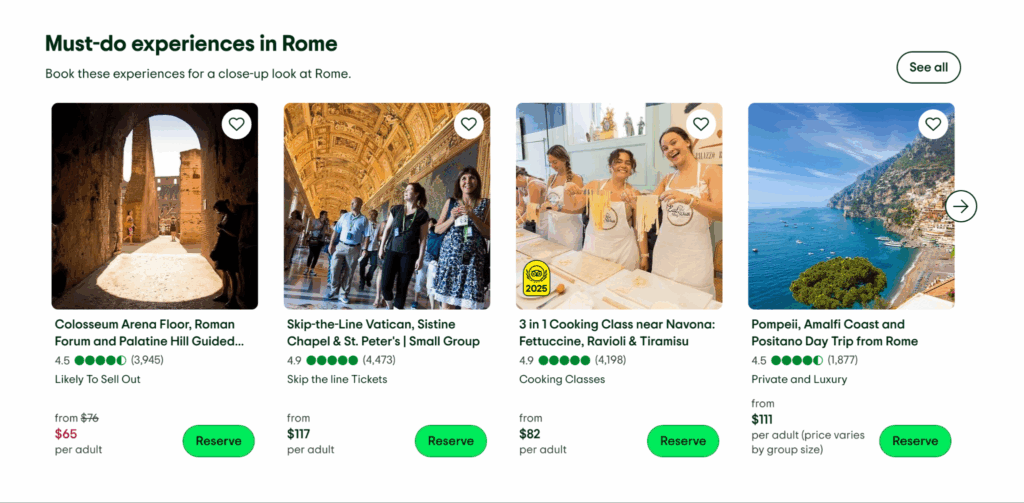
https://www.tripadvisor.com/Attractions-g187791-Activities-Rome_Lazio.html
Miro Templates
Miro is a great example of how available resources could be leveraged to help users and attract more SEO traffic. Their templates section provides lots of different templates for workflows, wireframes etc. created both by the Miro team, and members of its community.

Finally, I hope that you have as much fun with pSEO as I always do!
Feel free to reach out if you have any questions:)